
NTS Radio: Music Discovery
NTS RadioMusic & Audio
4.491.00 Reviews
- Version
- 3.3.3
- Installs
- 100.00K
- Age Rating
- Teen
Screenshots
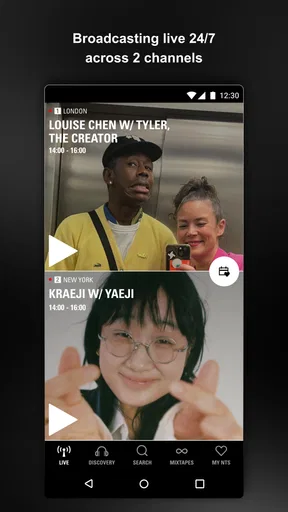
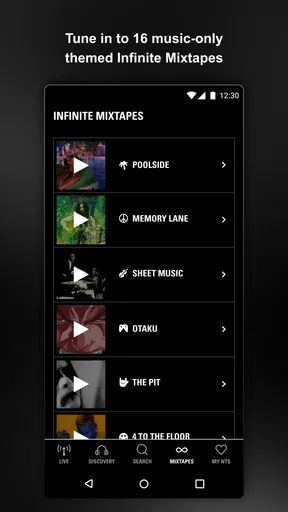
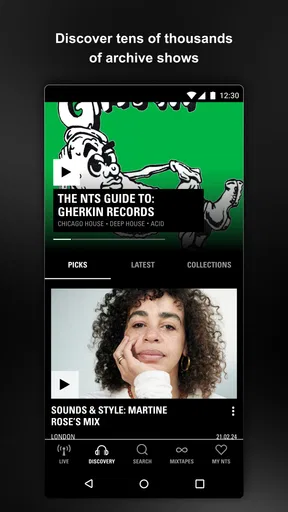
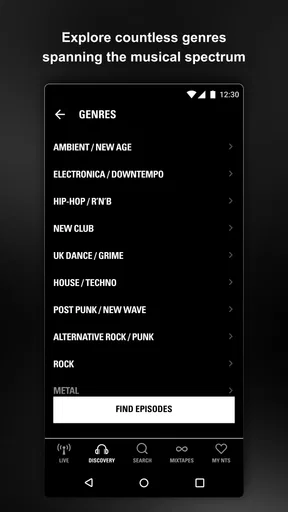
Our Review of NTS Radio: Music Discovery
 Analysis by Appyee
I approached NTS Radio as a listener looking for something more adventurous than the usual music app. It is a free Music & Audio app from NTS Radio, built around live and curated listening rather than a personal library of familiar hits. After spending time with it, my impression is clear: this is best understood as a discovery tool and a window into specialist radio, not as a replacement for every streaming service you already use.
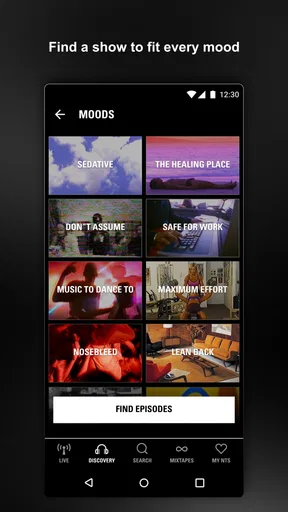
The appeal is immediate if you enjoy hearing music chosen by people with strong taste. Instead of beginning with a search box or an algorithm trained around your previous plays, the experience encourages me to enter through shows, DJs, artists, and moods. That small change in behaviour matters. I often found myself listening to something I would never have typed into a conventional search field, especially when I wanted background music with character rather than a predictable playlist.
How NTS Radio feels in everyday listening
When I think about NTS Radio in everyday use, I picture it filling a shared room with a considered selection rather than handing everyone a queue to manage. That can make it a pleasant choice for cooking or winding down together, as long as the household is happy to follow one programme at a time. The next question is how I’d keep that shared listening separate from each person’s own habits and choices.
A radio experience made for discovery
The central idea is simple: tune in to DJs and artists playing music they personally enjoy. In practice, that makes the app feel less like a catalogue and more like an ongoing stream of human choices. I am not only selecting tracks; I am choosing whose perspective I want to spend time with. That distinction gives the app its personality.
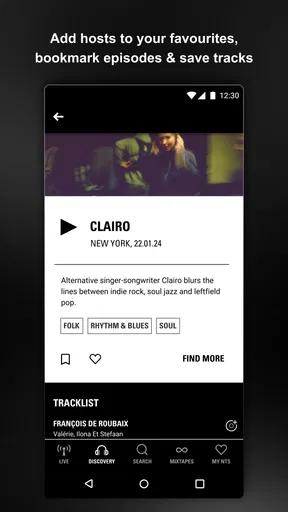
For me, the strongest use case was an ordinary work session. I opened the app before starting a long block of writing, picked a programme that sounded unfamiliar, and let it run without interrupting every few minutes to make another decision. The result was more engaging than a generic focus playlist but less demanding than actively digging through albums. When one selection caught my attention, I could make a note of the artist and investigate it later instead of stopping the session to search immediately.
That workflow is particularly useful for listeners who feel trapped by recommendation loops. Many mainstream services become very good at repeating the same broad preferences. NTS Radio works better when you want the opposite: a controlled amount of surprise, guided by a DJ or artist rather than only by your listening history.
Who will get the most from it
I would recommend it first to people who enjoy electronic music, left-field pop, jazz, experimental sounds, global selections, and specialist radio culture. You do not need to know the names of the performers before opening the app. In fact, the experience is more rewarding when you arrive without a strict shopping list and allow a programme to take you somewhere unexpected.
It is also a good fit for listeners who want music to accompany an activity. Cooking, commuting, studying, drawing, and relaxing all benefit from a service that can keep moving without requiring constant interaction. The app works especially well when the listener values atmosphere and curation over precise control of every track.
On the other hand, I would not make it my first recommendation for someone who mainly wants to play a specific song instantly, build a carefully ordered queue, or manage a large personal collection in one place. A conventional on-demand streaming service is usually more efficient for those jobs. NTS Radio asks me to accept the logic of radio: the reward comes partly from not knowing exactly what will play next.
The current app in practical terms
The app is free to install, carries a Teen content rating, and supports Android devices running version 6.0 or later. Its current version is 3.3.3, which gives existing users a useful reference point when checking whether their installation is up to date. The developer is listed as NTS Radio, and the app has passed the early-adopter stage with over one hundred thousand installs.
Its average rating sits at 4.4 from around one thousand three hundred ratings, with roughly ninety reviews visible alongside that broader response. I read those figures as a sign of a focused audience rather than proof that every listener will enjoy it. A specialist radio app can be excellent for the right person and still feel too open-ended for someone expecting the controls and predictability of a standard music library.
There are in-app purchases listed from $3.99 to $214.99 per item, although the basic app itself is free. That is worth keeping in mind before treating the experience as completely separate from optional spending. I would begin with the free experience and decide whether the service fits my listening habits before considering anything beyond it.
What the version history means for users
The current release number shows that the app has continued through multiple iterations since its original release on June 11, 2019. That is useful context because it suggests an established product rather than a brand-new experiment. At the same time, a version number alone does not tell me that every part of the interface has changed dramatically, so I would judge the app by its present handling and reliability rather than by the number attached to it.
For an existing user, the practical lesson is to treat version 3.3.3 as the baseline when troubleshooting. If the app behaves differently after an update, compare the current interface with your previous routine instead of assuming that an old guide still matches the screen. Radio applications can change the way programmes, live listening, or discovery areas are presented without changing their basic purpose.
I also appreciate that the product’s evolution has not pushed it toward becoming a generic music supermarket. Its identity remains tied to curated radio and artist-led selection. That focus is a strength, but it also creates a trade-off: improvements should preserve the feeling of exploration rather than bury it under too many conventional library controls.
Small habits that make the experience better
My first practical tip is to listen in two passes. During the first pass, I let a show play without trying to identify everything. During the second, I return when I have more attention and investigate the moments that stayed with me. This prevents the app from turning into a constant research task and makes discovery feel more relaxed.
A second useful habit is to use the app at the beginning of a task rather than halfway through one. Starting with a programme gives the session a musical direction before I become distracted by choosing tracks. If I need a particular energy level later, I can switch shows, but I am not beginning from an empty screen and making dozens of small decisions.
My third suggestion is to treat unfamiliar selections as a filter for future listening, not as commitments. A track can be interesting in the context of a DJ’s set without becoming something I want to hear repeatedly. That is one of the advantages of this format: I can value the discovery moment without forcing every discovery into a permanent playlist.
Where it differs from ordinary streaming apps
The usual alternatives in Music & Audio divide their attention between on-demand catalogues, algorithmic playlists, podcasts, and personal libraries. NTS Radio takes a narrower route. Its strongest feature is not the promise of finding any particular recording; it is the editorial path that leads me toward recordings I might otherwise miss.
That makes the comparison less about which app has more music and more about which kind of control I want. A catalogue service wins when I already know the album, artist, or song. An algorithmic playlist wins when I want convenience based on established habits. NTS Radio wins when I want a human-curated detour and am willing to surrender some control over the order and timing.
There is also a difference in attention. Search-led services encourage me to think in individual tracks. NTS Radio encourages me to think in sessions and programmes. I found that better for creating a sense of occasion, especially when I had enough time to let a selection develop rather than judging it after a single song.
Limitations I noticed while using it
The same openness that makes the app exciting can make it less approachable. If I arrive wanting a specific mood, the range of choices may feel less efficient than selecting a familiar playlist. The service rewards curiosity, but it does not remove the need for patience. Some listening sessions will connect immediately; others may require trying more than one programme before the fit becomes clear.
It can also be harder to use when I am in a hurry. A conventional service is designed around quick answers: search, tap, play. NTS Radio is better when I have a few minutes to browse and accept that the best result might not be obvious at first. That is not a flaw in its concept, but it is a real friction point for commuters or anyone trying to start music while multitasking.
Listeners who need strict control should think carefully before making it their only music app. Radio-style discovery is not the same as selecting an exact sequence for a workout, a party, or a carefully timed presentation. For those situations, I would keep a more traditional service available and use NTS Radio as the source of new ideas and unexpected listening.
Questions I would ask before installing
Does it replace a normal streaming subscription? In my view, no. It can complement one very well, particularly if your existing service feels repetitive, but it serves a different purpose. I use a catalogue-focused app when I know what I want and turn to NTS Radio when I want someone else’s musical point of view.
Is it suitable for casual listeners? Yes, provided they are comfortable exploring. You do not need specialist knowledge to begin, but the app makes more sense when you are willing to sample programmes instead of expecting an instant personalised mix. Casual listeners who want familiar chart music on demand may find a simpler alternative more satisfying.
Can it help someone discover new artists without active research? That is one of its best qualities. I can let a show run while doing something else and still come away with names or sounds worth revisiting. The important trade-off is that discovery is less transactional: I may not identify every track immediately, and I may need to remember which moment prompted my interest.
Is the free version a sensible starting point? Yes. Since the app is free, I would install it and test it during several different situations: focused work, relaxed evening listening, and a short session when I am in a hurry. That gives a more honest picture than judging it after one programme. Optional in-app purchases are present, so I would pay attention to the purchase screen and decide only after the core listening experience has earned a place in my routine.
What I would like to see watched over time
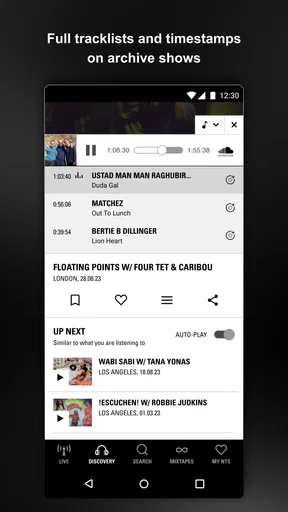
For future updates, I would pay attention to how the app balances discovery with orientation. The most valuable improvements would help me understand where I am in a programme, return to something that caught my ear, and move between live-feeling radio and deeper exploration without making the interface feel like a standard catalogue.
I would also watch whether new releases preserve the app’s distinctive editorial voice. Adding convenience is useful, but too much emphasis on familiar streaming patterns could weaken the reason I opened NTS Radio in the first place. Its value comes from the relationship between the listener and the person shaping the selection.
Existing users should therefore look for changes that improve navigation and continuity while keeping the sense of surprise intact. New users should judge the app on that same balance. If the current version makes it easy enough to browse while still encouraging unexpected choices, it remains compelling. If you need perfect predictability, the same design philosophy may continue to feel like an obstacle.
My final recommendation
NTS Radio is a focused, characterful music app that I would recommend to anyone tired of hearing the same safe recommendations. Its free entry point makes it easy to try, and its established development history gives it more confidence than a short-lived novelty. The experience is at its best when I have time to listen as a whole session and let DJs or artists guide my attention.
I would not install it expecting a complete replacement for an on-demand library. Instead, I would place it beside my usual service and use it as a discovery engine, a source of atmosphere, and a way to hear music through someone else’s taste. If you want musical surprise with a human point of view, this is worth making room for; if you want instant, exact control, choose the conventional alternative first.
Verdict
Strengths of NTS Radio: Music Discovery
- Excellent selection of underground and emerging artists
- Live radio shows offer a strong sense of discovery
- Covers diverse genres from around the world
- Curated programming feels more personal than algorithmic playlists
- Available on both Android and iOS devices
Limitations of NTS Radio: Music Discovery
- Some shows may be too niche for casual listeners
- Audio quality can vary between live broadcasts and mixes
- Limited mainstream music selection
- Finding specific tracks or artists is not always straightforward
- Background playback may depend on device settings
Similar Picks in This Category
View All
YouTube Music
Google LLC4.4

Samsung Music
Samsung Electronics Co., Ltd.3.8

Spotify: Music and Podcasts
Spotify AB4.3

JioSaavn - Music & Podcasts
Saavn Media Limited4.3

Lark Player:Music Player & MP3
Lark Player Studio - Music, MP3 & Video Player4.6

StarMaker: Sing Karaoke Songs
SKYWORK AI PTE. LTD.4.3
Frequently Asked Questions
What is NTS Radio: Music Discovery?
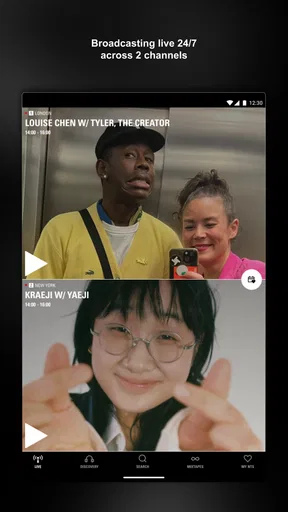
NTS Radio is a global music-streaming app focused on discovery rather than conventional hit playlists. It gives you access to live broadcasts, archived shows, DJ mixes, and specialist programming from artists and selectors around the world. The catalog covers genres ranging from electronic, jazz, hip-hop, ambient, soul, and experimental music to many harder-to-classify sounds.
Is NTS Radio free to use?
You can listen to a large selection of NTS Radio content without paying, including live stations and many on-demand shows. The app may also offer optional membership features through NTS Supporters, depending on the current plan and region. A subscription is not generally required for basic listening, but checking the latest in-app pricing is recommended before subscribing.
Can I listen to NTS Radio offline?
Offline listening depends on the content and membership features currently available in the app. Live radio requires an internet connection, while selected archived programs or mixes may be available for offline playback under an eligible plan. If uninterrupted listening is important to you, open the show or track options and confirm whether downloading is supported before leaving Wi-Fi.
What kind of music and programs can I find on NTS Radio?
NTS Radio is particularly suitable for listeners who enjoy exploring unfamiliar music. Its programming includes curated DJ sets, artist residencies, interviews, themed broadcasts, and genre-focused shows. You may encounter underground electronic music, rare grooves, classical recordings, global sounds, punk, metal, R&B, spoken-word programming, and experimental selections that are not usually highlighted by mainstream streaming services.
Does NTS Radio work on both Android and iPhone?
NTS Radio is designed for mobile listening and is available for compatible Android and iOS devices through their respective app stores. Performance can vary according to your phone, operating-system version, and connection quality. Before downloading, make sure your device meets the store requirements and that you have enough storage if you plan to save supported programs for offline listening.
